Overview
This section contains the steps on how to create typical bids (aggregated bids) using iBidAgg.exe. You can generate these through the Graphical User Interface (GUI) or via a batch script for automation.
Step-by-Step Guide
Follow the phases below to configure, generate, and collate your aggregated typical bids.
- Phase 1: Generation
- Phase 2: Validation
- Phase 3: Collation
1
iBidAgg
- Launch the Application: Open
iBidAgg.exelocated atC:\Program Files (x86)\iEnergy\. - Select Data: Choose the historical bids you want to aggregate from the interface.
- Apply Filters: Click the Filters button to refine your data.
- Configure the day type (e.g., Workday, Saturday, Sunday).
- Edit the Unit Capacity Thresholds.
- Click OK.
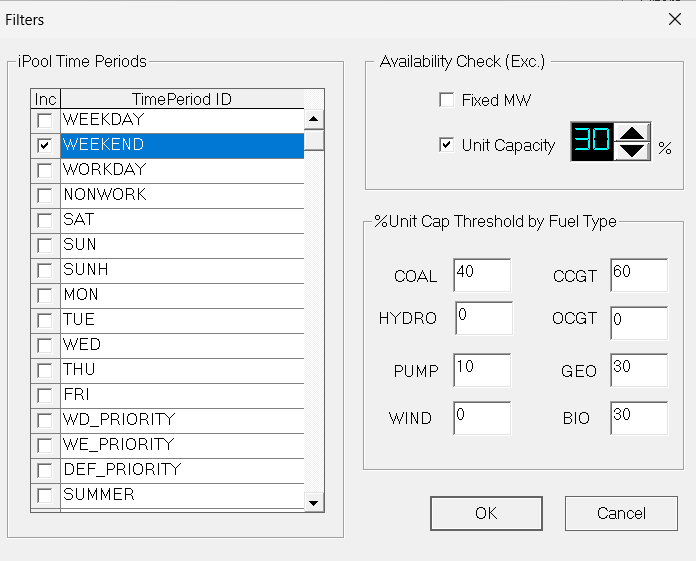
- Execute: Enter the desired filename and click Aggregate.
2
Batch File
For faster processing or scheduled tasks, you can use a batch script. Copy the following into Notepad and save it as RunBidAgg.bat in your working directory.
note
To generate reliable Aggregated Bids, a minimum look-back window of 7 days is required. Ensure the Number of Days field is set to 7 or more, using the latest available data relative to the start of the simulation.
warning
Change the date in -t according to the desired start date of bids to aggregate.
RunBidAgg.bat
  ```bat
call DefInit.bat
set "PATH=C:\Program Files (x86)\iEnergy"
REM ===========================================
REM -cap_COAL 70    means for all COAL stations, aggegate only if the available capacity is greater than or equal to 70%.
REM -cap_CCGT 40    means for all CCGT stations, aggegate only if the available capacity is greater than or equal to 40%.
REM -cap 0          means for all other stations, aggegate the available capacity including when it is 0%.
REM -bt WORKDAY     means apply only for dates that are WORKDAY calendar day type. (Monday to Friday except holidays).
REM Note:  tried -cap_COAL 70 for WD.bid not good.   Suggest try -cap_COAL 40 and compare results of simulation.
REM Input Folder is DirBid and Output Folder is DirSub in Defaults.csv
REM -s Filename.bid saves the typical bid to the Bids folder
REM ===========================================

iBidAgg.exe -t "20251124" -ndays 7 -cap 0 -cap_COAL 10 -cap_CCGT 10 -bt SUN     -s SUN.bid -log
iBidAgg.exe -t "20251124" -ndays 7 -cap 0 -cap_COAL 20 -cap_CCGT 10 -bt SAT     -s SAT.bid -log
iBidAgg.exe -t "20251124" -ndays 7 -cap 0 -cap_COAL 50 -cap_CCGT 40 -bt WORKDAY -s WD.bid -log